To do copy paste on vim, we can use visual mode by typing v when on normal mode. Use cursor to select the text to copy. Below we select 6 characters. After selecting the text then press y to copy the text to register.
Continue reading “Vim : Copy Paste Operation”Optimize linux battery life
Ubuntu/Debian : sudo apt install tlp
to start it : sudo tlp start
to show stat : sudo tlp stat
Long time no see wordpress ! been busy lately.
Starting Qt5 development on Ubuntu 20
To install Qt5 package needed to develop do :
sudo apt install qt5-default
Create a new folder to contain qthello project files.
mkdir qthello
cd qthello
Continue reading “Starting Qt5 development on Ubuntu 20”Check Battery Status using terminal on Ubuntu 20
To do this on command prompt or terminal we can install acpi package.
sudo apt install acpi
After installing acpi package run below command.
acpi -V
Compile Minimum Profit 5.41 under Ubuntu 20
- Get mp-5.4.1 source code from https://triptico.com/software/mp.html
- Install build-essential package (sudo apt install build-essential)
- Install libncurses-dev (sudo apt install libncurses-dev)
- Install libgtk-3-dev (sudo apt install libgtk-3-dev)
- Copy mpdm folder from mp-5.4.1 folder to parent folder.

- open terminal goto mp-5.4.1 folder and run ./config.sh

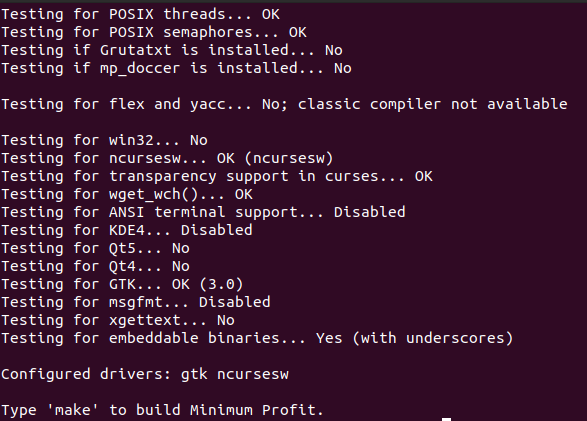
- Check if gtk and ncurses driver registered by config script.
- Type make to compile.
- Type make install to install the mp-5 executable.
Ubuntu Server : Turn off Laptop LCD/Monitor
Lately im installing Ubuntu Server 18.04 on laptop and wondering how to turn off the LCD because as a server it need to be turned on for 24 hours but the screen we dont need it as we can ssh from another machine.
To do this we will need vbetool utility. Get it by running sudo apt-get install vbetool from terminal.
Command to turn off LCD : vbetool dpms off
Command to turn on LCD : vbetool dpms on
“gem install pg sqlite3” required packages on ubuntu 18.04 LTS
apt-get install postgresql-client sqlite3
apt-get install libpq-dev libpqtypes-dev libsqlite3-dev
gem install pg sqlite3
Install sqlite3 gem
To install sqlite3 gem we need to install development package for ruby and sqlite3 it self because of the need to compile gem native extension.
On ubuntu/mint/debian do as follow :
apt-get install ruby-dev
apt-get install libsqlite3-dev
Dont forget to execute as root.
After that we can execute gem install sqlite3.
Thats all … Bye.
Happy chinesse new year 2570 !
Installing wxWidgets on Debian based linux
Debian based linux like ubuntu and linux mint can use these steps to install wxWidgets.
$ sudo apt-get install build-essential
If we do not have a C++ compiler yet, we install the build-essential package.
I think this is an meta package that install the actual packages for programming task.
$ sudo apt-get install libwxgtk3.0-dev
This installs the wxWidgets package.
To test it with minimal console application that emit some text we will create console.cpp and compile it.
#include <wx/wx.h>
int main(int argc, char **argv)
{
wxPuts(wxT(“A wxWidgets console application”));
}
Continue reading “Installing wxWidgets on Debian based linux”