Do you need a Tcl tutorial ? Salvatore write one that we can read online here :
http://www.invece.org/tclwise/
Also check out a n interesting Tcl language implementation here :
http://jim.tcl.tk
A Computer Person Journey
Do you need a Tcl tutorial ? Salvatore write one that we can read online here :
http://www.invece.org/tclwise/
Also check out a n interesting Tcl language implementation here :
http://jim.tcl.tk
The notes application now is more sophisticated : can add note and browse note by note id. Search by keyword still a to do task but its give a lot of experience coding in tcl/tk.
Download source code here

Warning still in progress and still learning how to code tcl/tk.
Extract and execute using wish notes_sqlite3.tcl

Hello world using tcl/tk presented below may be more clear than oneliner before.

Here is the result.

Done.
Creating classic hello world program using GUI in Tcl/Tk can be done in few lines or may be only a line !
Oneliner can do below.
pack [button .b1 -text “Hello World” -command exit -width 50]
This line can be read : pack a button named .b1 with hello world text and exit command when clicked.
Save it to hello_oneline.tcl then run on command prompt : wish hello_oneline.tcl.
Voila!

Click the button and the window will close.
Bye ..
Logging application activity to a log file is a best practice to do by a programmer. Here is how we can do it in Tcl scripting language.
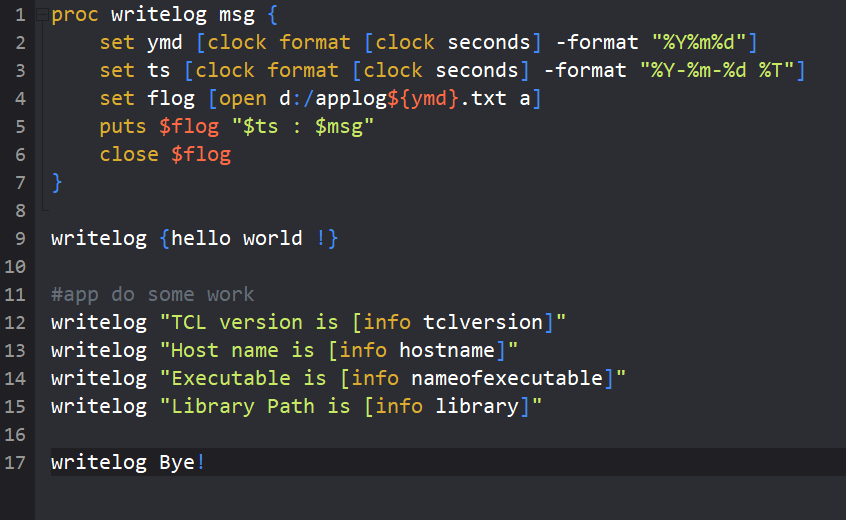
Line 1 to 7 is a proc definition named writelog with a parameter. Parameter will contain message to be written to log file located in d:/applogYYYYMMDD.txt based on current date of clock command. Different day will have a different log file.
Line 9 to 17 is some test to writelog. If we pass hello as parameter to writelog command then “YYYY-MM-DD HH:mm:ss : hello” will be written to log file. Every call to writelog will create new line and put current date time on the beginning of line.
Bye!
To bring tcl/tk programming language and some database connectivity for tcl on OpenBSD do command below as root :
pkg_add tcl tk sqlite3-tcl pgtcl
OpenBSD 6.6 can install tcl/tk 8.5 and 8.6.
Two extra package named sqlite3-tcl and pgtcl will give tcl capability to work with sqlite3 database and postgresql database.
Tdbc also a good choice for database connectivity. Tdbc packages on OpenBSD available for mysql, postgres, sqlite3. To add tdbc , we can do pkg_add tdbc-postgres tdbc-mysql tdbc-sqlite3.
Later will write more about tcl/tk.